Your agents finish.
gitnolo ships.
It watches Claude Code, Kiro and Antigravity, then commits, opens the PR and merges the moment a task is done.
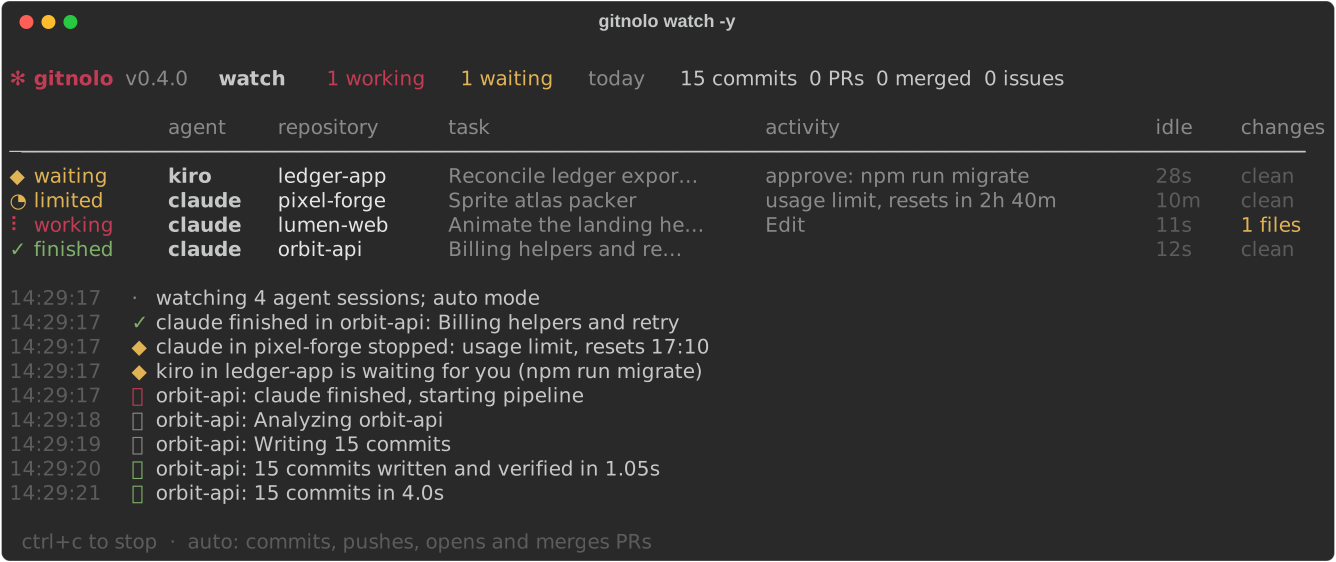
It knows why your agent stopped.
gitnolo reads each agent's own session log, so it never commits half a thought.
Finished
Commits, PR and merge start once the files settle.
Waiting for you
An approval prompt is open. You get a notification.
Usage limit
Shows when it resets, and tells you when it has.
Network or login
Connection drops, outages and expired logins, named plainly.
Interrupted
Partial work goes to a draft PR. Never merged.
Stuck or closed
Loops, silent stalls and agents that quit mid-task.
Clean history, without lifting a finger.
Up to 15 focused commits per change
Split from file groups down to single lines. Each message names the function it touches.
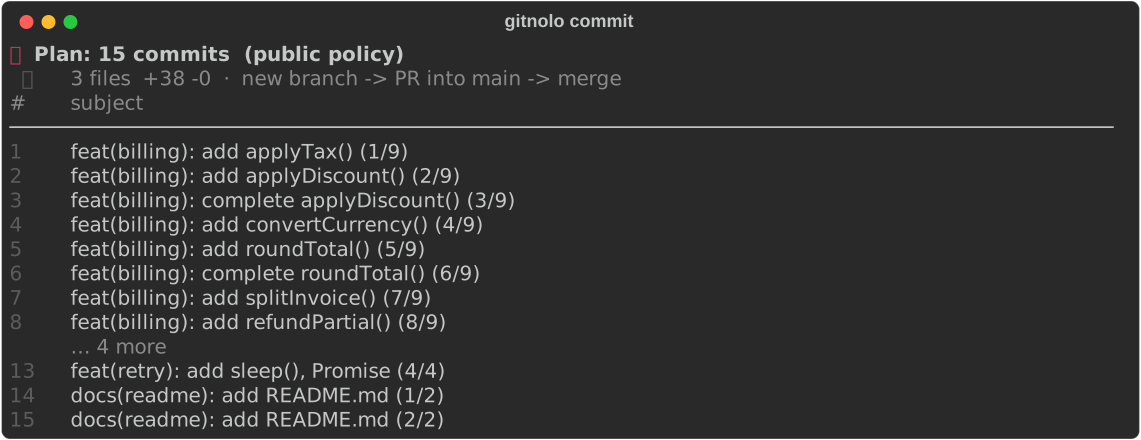
Branch, PR, merge
Pushed to its own branch, opened as a pull request, merged, and your local main kept in sync.
Issues from the agent's report
"Still fails on negative totals" becomes a labelled issue, linked from the PR. Resolved notes are ignored.
Never touches your files
Commits are built beside your working tree, verified byte for byte. Secrets like .env and keys are refused.
Commits written in one pass
final tree verified ✓
no hooks, no checkout, no waiting ✓
Terminal git client
Everything GitKraken does. In your terminal, on arrow keys.
No commands to remember. Run gitnolo, move with ↑ ↓, press enter.
 billing.py   file 1/2  conflict 1/3  0 resolved
╭─ ours · HEAD ─────────╮ ╭─ base ──────────────╮ ╭─ theirs · fix-tax ───╮
│ rate = 0.18         │ │ rate = 0.16         │ │ rate = TAX[country] │
╰─────────────────────╯ ╰─────────────────────╯ ╰─────────────────────╯
  ▌ours▐  both   theirs   base
╭─ result (preview) ─────────────────────────────────────────────────╮
│ rate = 0.18                                                          │
╰──────────────────────────────────────────────────────────────────────╯
 ←→ choose  ⏎ accept  ↑↓ conflict  a AI merge  e edit  esc quit
Interactive commit graph
Branches and merges in color-coded lanes. Pick any commit to check out, branch, tag, cherry-pick, revert or explain it. gitnolo graph
No-command operations
Tick files to stage, commit with a suggested message, push, pull, switch, merge, tag and stash from one menu. gitnolo ops
3-way merge conflict editor
Ours, base and theirs side by side with a live result. Choose with arrows, let AI merge, or edit. gitnolo conflict
Interactive rebase
Grab a commit with space and move it. Squash, fixup, reword or drop, then apply with enter. gitnolo rebase
AI that explains history
What a commit, file or line range did, why, and what to watch for. Free OpenRouter or local Ollama. gitnolo explain
GitHub and GitLab
Pull requests, merge requests, issues and auto-merge on github.com, gitlab.com and self-hosted GitLab.

GitLens, in your terminal.
Blame heatmaps, line history, graphs, branch compare and hotspots. No editor required.
blamehistorygraphcomparebrancheshotspotscontributorssearchstashworktreeconflictopsrebaseexplain
Benchmarks · gitnolo 0.4.0 · measured 2026-10-05
Starts in 223 ms. 1.9× faster on Python 3.15.
Measured on one laptop (Intel Core i5-10310U CPU @ 1.70GHz, macOS 26.7.1), against gitnolo on older interpreters and five popular git and commit tools. Raw data: results.json and scale.json.
Cold start against other git tools
Time to run --version in a fresh process and exit: the fixed cost every command pays. gitnolo on Python 3.15 is 1.9× faster than the quickest other tool, czg. Lower is better.
Peak memory at startup
Maximum resident memory while running --version. Lazy imports keep unused modules out of memory, and Python starts lighter than Node. Lower is better.
How commit time grows with commit count
The same 12-file change split into 1 to 80 commits. gitnolo on Python 3.15 went from 2.73 s for one commit to 3.10 s for 80, because commits are written in a single git fast-import pass. Past 10 commits the lines cross: the interpreter gap is smaller than run-to-run noise. Lower is better.
- Python 3.15, lazy imports
- Python 3.15, eager
- Python 3.12
Committing a real change
12 edited files (+112 lines), committed offline. Plain git add and git commit is the floor: gitnolo is slower for a single commit because it analyzes the change, plans commits and verifies the final tree.
- plain git
- Python 3.15, lazy imports
- Python 3.15, eager
- Python 3.12
The same code on three interpreters
gitnolo 0.4.0 on Python 3.12, on Python 3.15 with lazy imports blocked, and on Python 3.15 with lazy imports on. Startup gains are largest; commands dominated by git, such as graph, change little (+3%, within run-to-run noise).
- Python 3.15, lazy imports
- Python 3.15, eager
- Python 3.12
Help screen
Time to print --help, which builds the full command parser. Lower is better.
All results and how they were measured
| Tool | Version | Cold start | --help | Peak memory |
|---|---|---|---|---|
| gitnolo · py3.15 lazy | 0.4.0 | 223 ms ± 31 ms | 222 ms ± 21 ms | 24.6 MiB |
| gitnolo · py3.15 eager | 0.4.0 | 334 ms ± 44 ms | 327 ms ± 14 ms | 31.2 MiB |
| gitnolo · py3.12 | 0.4.0 | 431 ms ± 33 ms | 430 ms ± 40 ms | 25.9 MiB |
| czg | 1.14.0 | 432 ms ± 12 ms | 435 ms ± 5 ms | 67.3 MiB |
| AICommits | 4.2.2 | 439 ms ± 33 ms | 444 ms ± 17 ms | 72.5 MiB |
| OpenCommit | 3.3.10 | 597 ms ± 8 ms | 640 ms ± 28 ms | 94.6 MiB |
| Commitizen | 4.19.1 | 1.06 s ± 62 ms | 1.17 s ± 444 ms | 42.8 MiB |
| Aider | 0.86.2 | 2.26 s ± 114 ms | 2.30 s ± 96 ms | 73.6 MiB |
| Workload | Python 3.12 | 3.15 eager | 3.15 lazy | Change vs 3.12 |
|---|---|---|---|---|
| graph | 592 ms ± 134 ms | 684 ms ± 140 ms | 607 ms ± 180 ms | +3% |
| insights | 1.89 s ± 523 ms | 1.74 s ± 130 ms | 1.54 s ± 80 ms | -18% |
| plan 20 commits (dry run) | 2.17 s ± 115 ms | 1.98 s ± 173 ms | 1.94 s ± 155 ms | -10% |
| 1 commit | 3.04 s ± 279 ms | 3.67 s ± 613 ms | 2.78 s ± 290 ms | -8% |
| 20 micro-commits | 2.88 s ± 18 ms | 2.79 s ± 74 ms | 2.64 s ± 54 ms | -8% |
| 1 commit (scaling run) | 3.15 s ± 404 ms | 2.94 s ± 122 ms | 2.73 s ± 114 ms | -13% |
| 5 commits (scaling run) | 3.01 s ± 129 ms | 2.81 s ± 64 ms | 2.68 s ± 71 ms | -11% |
| 10 commits (scaling run) | 3.16 s ± 83 ms | 2.98 s ± 33 ms | 3.08 s ± 259 ms | -3% |
| 20 commits (scaling run) | 3.50 s ± 344 ms | 3.26 s ± 233 ms | 3.15 s ± 260 ms | -10% |
| 40 commits (scaling run) | 3.45 s ± 448 ms | 3.21 s ± 255 ms | 3.21 s ± 289 ms | -7% |
| 80 commits (scaling run) | 3.29 s ± 101 ms | 3.32 s ± 390 ms | 3.10 s ± 230 ms | -6% |
Machine
Intel Core i5-10310U CPU @ 1.70GHz, 16 GB RAM, macOS 26.7.1. Python 3.15.0rc3, Python 3.12.8, Node v24.15.0.
Runs
Each run is a fresh process, timed from spawn to exit. Warm-up runs are discarded. Peak memory comes from the kernel's per-process resource usage.
Eager baseline
Python 3.15.0rc3 has no switch to turn lazy imports off, so the eager build installs a lazy-import filter that rejects every module. Same interpreter, same code.
Fair comparison
All tools ran offline with an empty home directory. OpenCommit, AICommits and Aider need an AI model for their main job, so only their startup and memory are compared.
What each tool does
Aider is a coding agent with auto-commits. OpenCommit and AICommits write commit messages with AI. czg and Commitizen guide conventional commits.
Fixture
A local clone of the gitnolo repository with 12 edited files (+112 lines), reset before every run so each run commits the identical change.
Free for public repositories
Running in under a minute.
Install
macOS or Linux, Python 3.9+
Check
Uses the GitHub login git already has
Watch
Leave it running beside your agents
Uninstall
Removes the app and the command. Add --purge to also delete settings and sign-in
Optional AI summaries with a free OpenRouter key: gitnolo config set openrouter_api_key sk-or-...
Frequently Asked Questions
Answers for engineers & agent operators.
Which AI coding agents does gitnolo support?
gitnolo directly parses session transcripts for Anthropic Claude Code, AWS Kiro, and Google Antigravity. It detects if an agent is active, waiting for approval, rate-limited, interrupted, or finished.
How does it create micro-commits without touching files?
Commits are constructed out-of-process using git fast-import beside your working tree and byte-verified against disk before moving branch refs. Sensitive files like .env and secrets are rejected.
How do automated pull requests and merges work?
When an agent completes and file writes settle, gitnolo creates a branch, commits with Conventional Commit messages, pushes to GitHub, opens a PR, merges it, and synchronizes your local branch.
Does gitnolo require a paid AI API key?
No. gitnolo functions 100% offline using deterministic AST analysis. Optional AI summaries and issue filtering can be enabled using a free OpenRouter key or a local Ollama model.
What terminal GitLens features are included?
Interactive age-colored blame heatmaps, file and line history (git log -L), an interactive commit graph, branch comparison, churn hotspots, a side-by-side 3-way conflict editor and AI history explanations.
Is gitnolo free for open source projects?
Yes. The community edition is completely free and MIT-licensed for all public GitHub repositories. Install via curl or clone the repository directly.
Is gitnolo a GitKraken alternative?
Yes, for people who live in the terminal. gitnolo gives you an interactive color-coded commit graph, point-and-select staging, commit, push, pull, branch, merge and tag, a side-by-side 3-way merge conflict editor, interactive rebase and AI explanations, all driven by arrow keys. It is free and also automates git for AI coding agents.
Does gitnolo work with GitLab?
Yes. gitnolo opens and merges GitLab merge requests and files GitLab issues the same way it does on GitHub, on gitlab.com and on self-hosted GitLab servers. It reuses the login git, glab or GITLAB_TOKEN already provide.
How do I resolve merge conflicts in gitnolo?
Run gitnolo conflict, or just merge or pull from gitnolo ops. Each conflict opens side by side: ours, the common base and theirs, with a live result preview. Choose with the arrow keys, ask AI to merge it, or edit by hand. Resolved files are staged and the merge continues.
Can gitnolo do an interactive rebase?
Yes. gitnolo rebase lists your recent commits; press space to grab a commit and move it with the arrow keys, then mark commits to squash, fixup, reword or drop and press enter to apply.
Can AI explain my git history?
gitnolo explain summarises a commit, a file's history or a range of lines: what changed, why, who drove it and what to watch for. It works with a free OpenRouter key or a local Ollama model.
How fast is gitnolo?
On a 2019 Intel Core i5 laptop, gitnolo 0.4.0 on Python 3.15 starts in 223 ms and uses 24.6 MiB of memory. It splits one change into 20 verified commits in 2.64 s.
What are Python 3.15 lazy imports?
PEP 810 lets a module declare imports that load on first use instead of at startup. gitnolo lists its imports in __lazy_modules__, so Python 3.15 skips loading rich, urllib, json and its own modules until a command needs them. Older Python versions ignore the list and import everything up front.
Is gitnolo faster than Aider or OpenCommit?
At startup, yes: 223 ms for gitnolo against 597 ms for OpenCommit and 2.26 s for Aider. These tools do different jobs, and OpenCommit, AICommits and Aider call an AI model for their main work, so only startup time and memory are compared.
Is gitnolo faster than plain git?
No. A single git add and git commit took 853 ms; gitnolo took 2.78 s for one commit because it analyzes the change, plans the commits and verifies the final tree. Its advantage is doing that work automatically, many commits at a time.